AI-generated example clip
Step 2 · Photo → Video
Photo Stack Flipbook
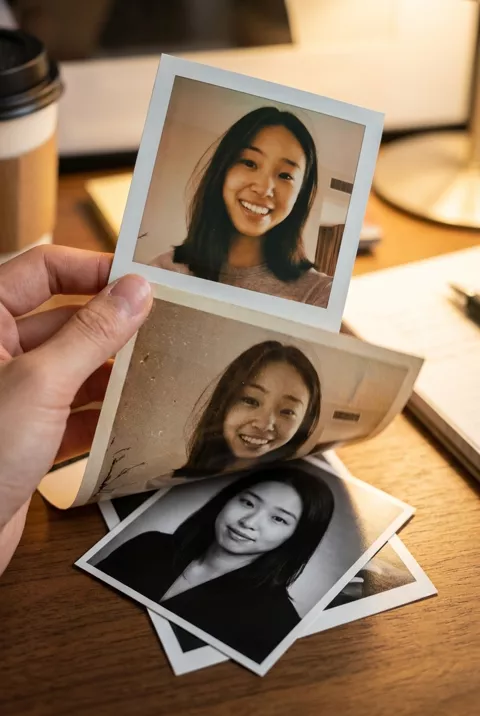
Your different AI styles flipped through like a deck of printed photos.
A hand flips through a small stack of printed photos of the same person in different aesthetic styles — Polaroid, vintage film, formal portrait — each one landing flat for a beat before the next flips in. Keep the face consistent and exactly as in the source photo across all styles. Warm desk lighting, satisfying rhythm, vertical 9:16, 6 seconds.
What to watch for
Every print came back with a different face. Ours drops three photos in sequence and each shows a recognisably different woman, which is the opposite of the point, and the aspect ratios vary too — square next to rectangular. Feed it your own finished images and assemble the sequence in a video editor instead; the model will not carry one likeness across several prints. The holding hand and the falling-paper motion are both good, which is the frustrating part.
How to use it
Only edit photos you have permission to use, including permission from the people pictured.
- For the generated experiment, start with a clear portrait. For a controlled sequence, prepare your finished style images with matching crops.
- Upload the portrait and paste the prompt to try the generated paper motion. If consistent faces are essential, assemble your finished images in a video editor instead. Request 6 seconds where the tool allows it; this is the requested clip length, not a generation-time estimate.
- Compare the face and aspect ratio on every print. If either changes, use the prepared images for the edited sequence rather than sharing invented likenesses.
- Download the accepted clip and label it as AI-made when sharing. Keep the source still so you can compare later revisions.
 Reels Transitions
  Reels Transitions